
Article sections
Creating a new survey is simple and very fast.
Just go to the survey and click the add new survey button.
This will be the screen you will see:
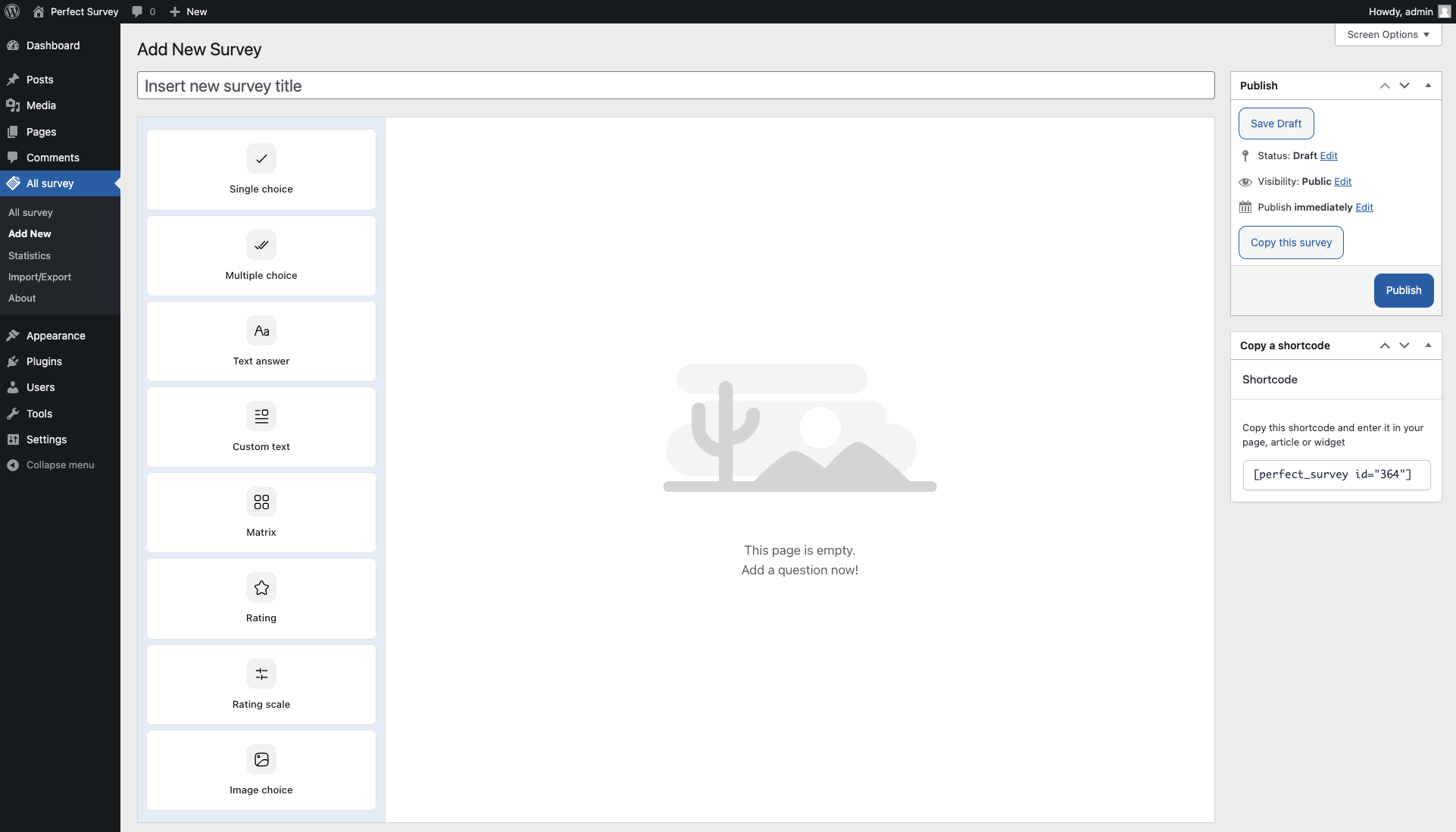
- Create your survey
- Settings
- Publish
- Copy a shortcode
Create your survey
This is the survey question editor and can add different type of questions as Single choice, Multiple choice, Text answer, Custom text, Matrix, Rating, Multiple rating, Images choice. Each type of question has its global settings and its possible answers.
Single choice
Useful for creating a series of answers that allow only one selection
Multiple choice
Similar to Single choice but accept multiple selections
Text answer
Text answer is a Jolly field, it allows you to create fields like text area. date field, number, email, text
Custom text
If you need to insert explanations between the questions, Custom text helps you with wysiwyg editor
Matrix
A field that crosses two different inputs, used for evaluations
Rating
If you need a rating scale this is the right field, choose from a myriad of icons
Multiple rating
It is the same as Rating but allows you to create a multiple Rating field with custom icons
Images choice
Used to create an image selection field, you can choose between multiple or single selection
When you click the type of field you want to insert, it will appear in the editor and you will be able to manage the settings for each type of field
Perfect Survey, you can use it for: market surveys, understand the satisfaction of your customers for products, services, understand what you like and what is not the best way to improve your business.
Related Articles
4 Comments
Leave A Comment
August 28, 2020 at 5:09 pm
Hi,
I downloaded this plug in but i cannot add questions. I did a demo and it worked fine however it does not create any action after i click on “add a question now”. I have deleted it and re downloaded, no change?
Help please.
September 1, 2020 at 1:17 pm
Dear Deanna,
you can write to our support
support@getperfectsurvey.com
so they can help you.
Thank you
Best
Perfect Survey Team
February 25, 2020 at 1:37 pm
Hi there,
at the monment i am using your plugin to create a simple customer survey. What i have found out after several usability tests, there is no refresh/reset button! My ip-address has been saved for the whole time. So i can not see the survey frontend anymore.
Is that true?
Geetings,
Thimo
February 25, 2020 at 3:03 pm
Dear user, everything is not based on IP but on cookies. To redo the test just delete the cookies from the browser history, or do the tests with the anonymous mode of the browser so the cookies will not be saved.
Perfect Survey Team